JobStack for Work | Daily Pay
TrueBlue®Business
4.73.47K Reviews
- Version
- 1.82.0
- Installs
- 500.00K
- Age Rating
- Everyone
Screenshots
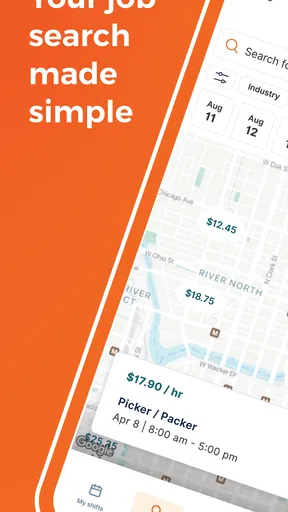
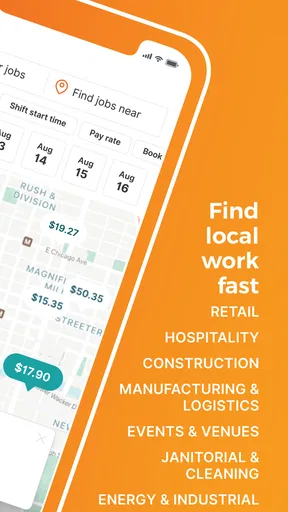
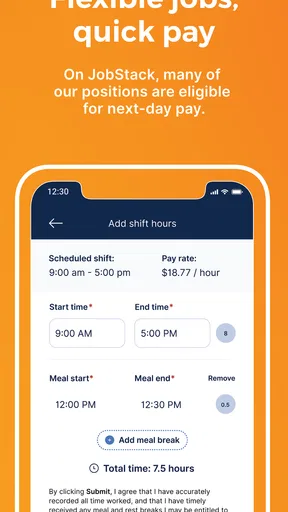
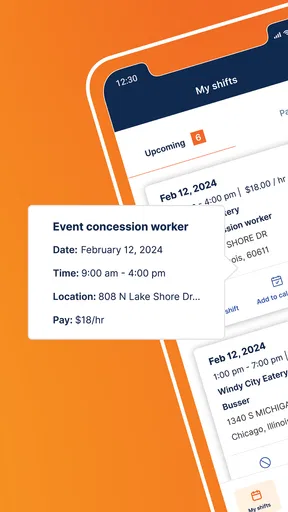
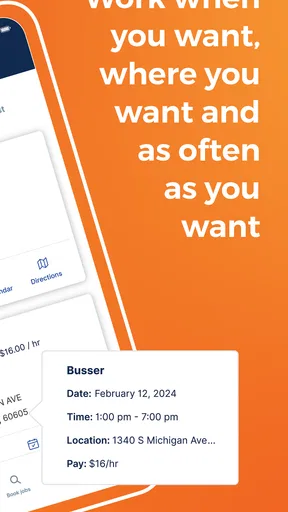
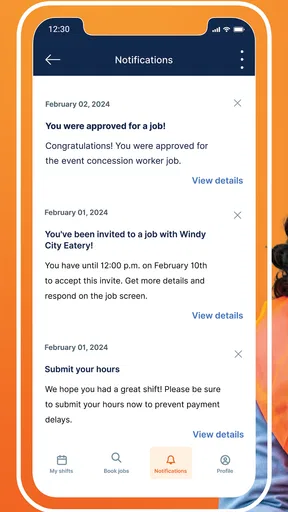


Our Review of JobStack for Work | Daily Pay
 Analysis by Appyee
If you need flexible work rather than a traditional job board, JobStack for Work | Daily Pay takes a more practical route. I found it most useful as a place to look for available gig jobs and shift work when I already knew roughly when I could work. Instead of building a long application queue, I could focus on finding a suitable shift, checking the details, and deciding whether it fitted my day.
That difference matters. A standard employment app is usually designed around resumes, company profiles, and longer hiring processes. This app, developed by TrueBlue®, is aimed at people who want to discover local work opportunities quickly. It is free, rated for Everyone, and belongs in the business category, but I would think of it less as a complete career-management tool and more as a focused shift-finding companion.
My overall impression is positive, especially for people who value flexibility and want to keep their search organized. The app has a 4.7 average from around 49 thousand ratings, with over 500 thousand installs, so it has clearly attracted a substantial audience. Still, the experience depends heavily on the work available in your area and on how carefully you manage your availability. It is not a magic shortcut to guaranteed income, and that distinction is important before you rely on it.
How I would use JobStack during a normal week
The simplest workflow is to open the app when I know I have time available, browse the local opportunities, and compare each shift against my real schedule. I would not treat the first attractive listing as an automatic choice. I would look at the location, timing, type of work, and any other information shown before committing. A shift that looks convenient on a phone screen can become a poor choice if travel takes too long or if it clashes with another responsibility.
For someone new to this style of work, I recommend starting with one shift rather than filling an entire week immediately. That gives you a chance to understand how the app presents work, how much information appears before accepting an opportunity, and whether the practical routine suits you. It also helps you judge the travel and timing without turning a first attempt into an exhausting schedule.
A realistic example would be a person who has a free weekday after dropping children at school. Instead of searching through permanent vacancies, they could use the app to check for a shift that begins after the morning routine and ends before pickup. The useful part is not simply seeing a job on the screen; it is matching that opportunity to the narrow window the person actually has. I found that this mindset makes the app more valuable than casual browsing.
The same approach works for someone between jobs who wants to keep working while applying for permanent positions. JobStack can sit alongside a conventional job search, giving that person a way to look for shorter-term work without abandoning longer-term plans. I would not use it as my only strategy if I wanted a stable career path, but it can be a practical supplement while I wait for interviews or hiring decisions.
One habit makes the baseline workflow much better: decide your limits before opening the app. I would write down the days I can work, the latest time I can finish, and the farthest location I can reasonably reach. Without those limits, it is easy to browse emotionally and accept something that technically fits but creates stress. The app helps surface opportunities; it cannot decide whether the whole day remains manageable.
What to check before accepting a shift
I would read every visible detail twice, particularly the start time and location. Flexible work often looks attractive because it fills a free space, but the surrounding travel can change the calculation. If a shift requires an early departure, a long commute, or an uncertain return journey, I would treat that as part of the commitment rather than an afterthought.
I would also compare the opportunity with the rest of my week. A single shift may be easy, while several scattered shifts can create more travel and waiting than expected. The app is best when I use it to build a deliberate pattern, not when I collect every available option. In my experience, a smaller number of well-matched shifts is more useful than a crowded schedule that leaves no room for delays or personal obligations.
People often want to know whether this is suitable for someone with no experience using gig-work apps. I think it is approachable, but the user still needs ordinary judgment. The interface can help with discovery, yet it does not replace checking directions, preparing for the work environment, or keeping track of commitments. I would recommend it to a beginner who is comfortable making those decisions, not to someone hoping the app will manage every practical detail automatically.
Settings and routines worth checking first
The most valuable settings are the ones that reduce irrelevant browsing. I would review any location, availability, and notification choices the app presents, then keep them aligned with my actual routine. If I am only able to work on certain days, there is little benefit in treating every possible shift as equally relevant. A cleaner search starts with honest boundaries.
Notifications deserve special attention because speed can matter when local work is limited. I would avoid turning on every alert without thinking. Too many messages can make important opportunities harder to notice, while too few may mean I check the app too late. My preferred approach would be to allow useful alerts, then make a deliberate daily check rather than relying entirely on notifications.
There is also a privacy and attention trade-off in any app that uses local job information. I would only enable the settings needed for the way I plan to search, and I would periodically revisit them if my routine changes. That is not a criticism unique to JobStack; it is simply good practice when a work app is part of everyday life. The goal is to remain reachable for relevant opportunities without allowing the app to dictate my entire attention.
The app is free, which lowers the barrier to trying it. Even so, free access should not be confused with free time. I would still account for transport, meals, preparation, and the possibility that a shift may occupy more of the day than its listed hours suggest. The app can make the search faster, but the economics of accepting work remain personal.
Its age rating of Everyone makes it broadly accessible from a content perspective, but that does not mean every work opportunity suits every person. A younger user, someone with mobility limitations, or anyone with strict transportation needs should still judge each listing against their own circumstances. The rating describes the app’s audience, not the demands of every shift shown inside it.
Faster patterns for experienced users
After the first few searches, I would stop treating the app as something to open randomly. A repeatable routine is faster: check at a consistent time, scan only the locations and days that fit, open promising listings, and make a decision before moving on. This prevents endless scrolling and helps me notice changes in availability without spending the entire day searching.
Another useful pattern is to keep a short mental list of acceptable areas rather than searching the whole region. If I know which locations are easy to reach, I can evaluate new opportunities more quickly. This is a simple habit, but it makes a major difference because the real decision is often not “is there work?” but “is this work practical for me?”
I would also separate browsing from commitment. During a quick check, I might identify possibilities without accepting anything immediately. Later, when I have confirmed transport and personal obligations, I could return to make the final choice. This two-step approach reduces impulsive decisions and is particularly helpful for people balancing childcare, classes, another job, or appointments.
For users who want daily pay, I would keep a personal record of the shifts I choose and the details associated with them. The app’s focus makes it convenient to look for work, but my own notes can help me compare locations, timing, and how well each opportunity fits. I would not assume that a promising shift automatically represents the best repeatable option. A reliable routine often comes from learning which kinds of work fit your life, not simply from accepting the most recent listing.
One non-obvious trade-off is the difference between flexibility and predictability. The ability to search for individual shifts is useful when my schedule changes, but it can make planning income more difficult than with a regular position. I would use the app confidently for filling gaps, testing a new work pattern, or finding short-term opportunities. I would be more cautious about depending on it alone for fixed monthly expenses unless I had already established a dependable personal routine.
Where the app is strong, and where it reaches its limits
JobStack’s strongest point is focus. It is designed around finding gig jobs and shift work rather than asking every user to create a broad professional profile and wait through a conventional recruitment process. That makes it more immediately useful for someone whose main question is, “What can I work soon, and does it fit my schedule?”
Compared with general job boards, the experience feels better suited to short-term availability. A general board is usually stronger when I want to compare permanent roles, read extensive employer information, tailor applications, and follow a career path. JobStack is more appealing when the priority is flexibility and local discovery. I would use both if I needed immediate work while also pursuing a permanent position.
Compared with asking friends, visiting staffing offices, or checking several company pages separately, a dedicated mobile workflow is more convenient. I can search from the same place and return to it when my schedule changes. The limitation is that no single app can guarantee a useful selection in every location. If the local opportunities do not match my skills, transport, or availability, the convenience of the interface does not solve that underlying problem.
I would also avoid assuming that every shift is equally suitable just because it appears in the same feed. Users need to read carefully and think beyond the headline. Work type, distance, timing, and personal readiness can matter more than how quickly the listing can be claimed. The app rewards attention; it is less suitable for people who want a completely hands-off process.
The current version is 1.80.0, and the app was released on September 28, 2023. Those details make it a relatively modern option for this kind of mobile search, but I would still keep the app updated through the normal store process. More importantly, I would judge it by whether its current local opportunities match my needs rather than by version numbers alone.
Who should skip it? I would look elsewhere if I wanted detailed career planning, extensive resume tools, professional networking, or a single long-term employer. I would also be cautious if I lived far from the areas where I could realistically work, had no dependable transportation, or needed guaranteed predictable hours. In those cases, a conventional employer, a broader job board, or a local staffing route may be a better primary option.
My verdict after building a repeatable habit
I see JobStack as a practical tool for people who want to search for local shifts without turning every opportunity into a lengthy application project. Its value grows when I use clear availability rules, review settings thoughtfully, and check the app with a repeatable routine. The strongest results come from treating it as part of a personal work system rather than as a replacement for planning.
I would recommend it to flexible workers, people looking to fill gaps between other commitments, and anyone curious about shift-based work who is willing to evaluate each opportunity carefully. The free price makes experimentation easy, and the large user base suggests that the approach has resonated with many people. Still, I would begin with a manageable commitment and learn how the available work fits my real life.
My final judgment is that JobStack for Work | Daily Pay is most effective when speed and flexibility matter more than long-term career structure. It can shorten the distance between “I have time to work” and “I have found a possible shift,” which is a meaningful advantage. The trade-off is that I remain responsible for judging consistency, travel, timing, and financial suitability.
If I needed a straightforward way to explore gig jobs and shift work, I would keep it installed and use it alongside broader employment resources. I would not depend on it blindly, but I would recommend it to a friend who understands its role: a focused local work-search app that becomes considerably more useful when paired with realistic limits, careful reading, and disciplined habits.
Privacy and Permissions
See what permissions an app requests and how it handles your data.
- Calendar
- read calendar events plus confidential information, add or modify calendar events and send email to guests without owners' knowledge
- Location
- approximate location (network-based), precise location (GPS and network-based)
- Photos/Media/Files
- read the contents of your USB storage, modify or delete the contents of your USB storage
- Storage
- read the contents of your USB storage, modify or delete the contents of your USB storage
- Camera
- take pictures and videos
- Microphone
- record audio
- Wi-Fi connection information
- view Wi-Fi connections
- Other
- view network connections, full network access, run at startup, control vibration, prevent device from sleeping
Verdict
Strengths of JobStack for Work | Daily Pay
- Flexible shifts make it easier to fit temporary work around your schedule.
- Daily pay options can improve access to earned wages after completing eligible shifts.
- The app shows job details, locations, pay rates, and shift times in one place.
- Useful for finding short-term work without committing to a permanent position.
- Shift alerts can help users discover new opportunities quickly.
Limitations of JobStack for Work | Daily Pay
- Job availability may vary significantly by city, industry, and season.
- Some shifts require transportation to locations that may be difficult to reach.
- Eligibility checks, onboarding, or background screening can delay your first shift.
- Daily pay may not apply to every job or may include applicable fees.
- Last-minute cancellations or changes can disrupt carefully planned schedules.
Similar Picks in This Category
View All
LinkedIn: Community & Network
LinkedIn3.8

Zoom Workplace
zoom.com4.1

Microsoft Teams
Microsoft Corporation4.6

Meta Business Suite
Meta Platforms, Inc.4.6

Webex Meetings
Cisco Systems, Inc.4.5

TeamViewer Remote Control
TeamViewer4.4
Frequently Asked Questions
What is JobStack for Work | Daily Pay?
JobStack for Work is a mobile staffing app that helps people find temporary, flexible, and sometimes same-day work opportunities through local PeopleReady branches. After creating a profile, you can browse available shifts, review job details, and request assignments directly from your phone. The app is mainly designed for workers seeking short-term employment rather than traditional full-time job applications.
How do I create an account and apply for jobs in JobStack?
To get started, download the app, register with your personal information, and complete the required profile and employment details. Depending on your location and the type of work available, you may need to provide identification, work eligibility information, experience, certifications, or complete an onboarding process with a staffing branch. Once approved, available shifts can be viewed and requested through the app.
Does JobStack really offer daily pay?
JobStack promotes access to daily-pay options for eligible workers, but payment timing can depend on several factors, including the assignment, branch policies, hours worked, timesheet approval, and the payment method available in your area. Not every shift or worker will necessarily qualify for immediate payment. Before accepting a job, carefully review the pay information and payment conditions shown in the app.
What types of jobs can I find through JobStack?
The available work depends heavily on your city, local labor demand, qualifications, and the PeopleReady branch supporting your account. Listings may include general labor, warehouse assistance, event staffing, hospitality, construction support, cleaning, transportation-related tasks, and other temporary roles. Each posting should include details such as location, schedule, expected duties, pay, and any required clothing, equipment, or experience.
What should I know before accepting a shift through JobStack?
Before accepting a shift, check the complete listing rather than relying only on the job title. Confirm the start time, exact location, transportation options, expected duration, pay rate, dress or safety requirements, and whether you must bring tools or documentation. Attendance and reliability are important because cancellations, lateness, or failing to report may affect your account, eligibility, or access to future assignments.
